Best Garden Planning Apps in 2026: We Tested 8 So You Don't Have To
Most garden apps help you plan in spring then go quiet. The best one runs the whole season — 7 container types, weather-driven tasks, AI bed filler, full harvest analytics. Here's the honest breakdown.
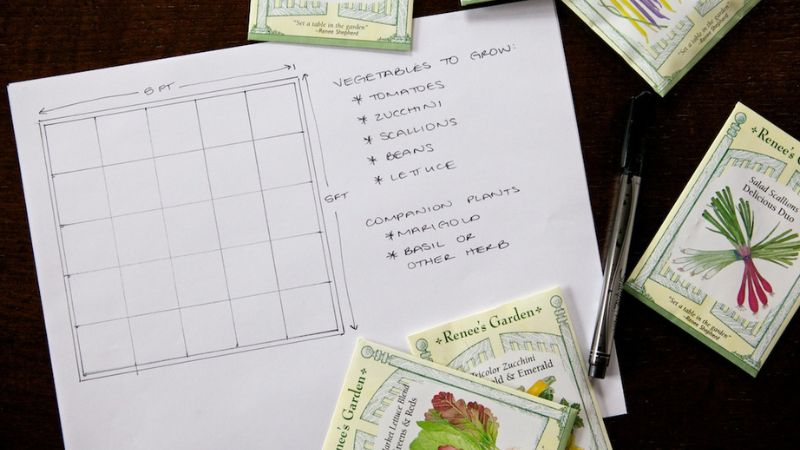
You know that feeling when March rolls around, you download a garden planning app, spend a whole Sunday mapping out your raised beds — and then never open it again until next March?
Yeah. Same.
Most garden apps are really pretty spreadsheets. They're great for planning, then go quiet the moment your plants are in the ground. The tomatoes don't care about your colour-coded layout. They need watering when it's dry and covering when frost is coming on Friday.
So we tested eight garden apps with one question in mind: which one are you still using in July?
🔄 Updated October 2026: every price and plan re-checked against each app's own site or app store listing.
⚡ Quick picks
- Best overall: EdenVatika (83/100) — plans your beds, then runs the season with you
- Best calendar-driven task list: Seedtime (73/100)
- Best on a phone: Planter (71/100)
- Best free logging: GiddyCarrot (64/100)
- Best plant diary: Gardenize (60/100)
- Best desktop layout tool: GrowVeg (58/100)
- For organic growers who want weekly orders: Smart Gardener (54/100)
- Houseplants only: Planta (49/100)
How We Scored Them
Most roundups count features. We asked something different: is the app still useful once the planning is over?
Each app got up to 20 points in five areas, for a total out of 100:
- Planning: layout grid, spacing, companion planting, crop rotation
- Active season: weather, automatic tasks, frost alerts, day-to-day use
- Harvest & tracking: harvest logs, multi-season history, notes
- Mobile & ease of use: speed, clarity, learning curve
- Value: free tier, price, trial, pricing transparency
We used each free tier to its limits and checked paid features through trials and each app's own documentation.
| App | Planning | Active season | Harvest | Ease of use | Value | Score |
|---|---|---|---|---|---|---|
| EdenVatika | 17 | 18 | 17 | 15 | 16 | 83 |
| Seedtime | 16 | 14 | 12 | 18 | 13 | 73 |
| Planter | 17 | 8 | 12 | 18 | 16 | 71 |
| GiddyCarrot | 12 | 6 | 16 | 15 | 15 | 64 |
| Gardenize | 6 | 4 | 20 | 16 | 14 | 60 |
| GrowVeg | 16 | 6 | 8 | 15 | 13 | 58 |
| Smart Gardener | 13 | 14 | 8 | 13 | 6 | 54 |
| Planta† | 4 | 10 | 4 | 17 | 14 | 49 |
†Planta is built for houseplants, not outdoor gardens. Its low garden scores reflect that, not the app's quality.
Quick Comparison
| App | Containers | Weather | Auto tasks | Harvest tracking | Free tier | Paid / year |
|---|---|---|---|---|---|---|
| EdenVatika | ✅ 7 types | ✅ Free; 7-day on Pro | ✅ Made when you plant | ✅ With grocery value | 2 beds | $19.99* |
| Seedtime | Beds, pots, towers | Paid plans | ✅ From your calendar | Top plan only | 1 calendar, 8 beds | $84 / $168 |
| Planter | Square-foot grid | — | — | — | 1 garden, ads | $24.99 |
| GiddyCarrot | Basic | — | — (manual) | ✅ Variety stats | 100 items | $40 |
| Gardenize | — | — | — | Diary only | Basic diary | $34.99 |
| GrowVeg | Rows and beds | — | Sowing emails | — | 7-day trial | $35–$50 |
| Smart Gardener | Basic | — | ✅ Weekly list | Journal | None | $39.99 |
| Planta | Houseplants | Watering only | ✅ Care reminders | — | Watering reminders | $35.99–$47.99 |
*Founding price, locked for life; $29/year after.
1. EdenVatika — Best Overall (83/100)
Best for: anyone who grows in more than one thing — beds, pots, baskets or hydroponics — and wants an app that's still useful in August.
Most apps give your whole setup the same rectangle. EdenVatika plans seven container types on their own terms: raised beds, in-ground rows, pots, hanging baskets, vertical planters, standalone planters and hydroponic systems.
Then it keeps working. Plant something and its watering, weeding, feeding and harvest jobs appear on their own. Each morning it tells you whether to water today, and warns you when frost is coming for your tender crops.
Most garden apps forget. Ours remembers — and acts on it.
What you harvested, and what struggled, shapes what EdenVatika suggests next season. The AI planner favours your proven performers, bed history warns about beds that keep getting pests, and harvest dates learn your pace — not a textbook's.
👍 What we like
- Seven container types, each with its own grid and its own care jobs (hydroponics get nutrient and pH checks, not watering).
- Weather wired into your jobs. A free "Water today?" answer, frost alerts on every plan, and on Pro a 7-day forecast with a skip button when rain is due.
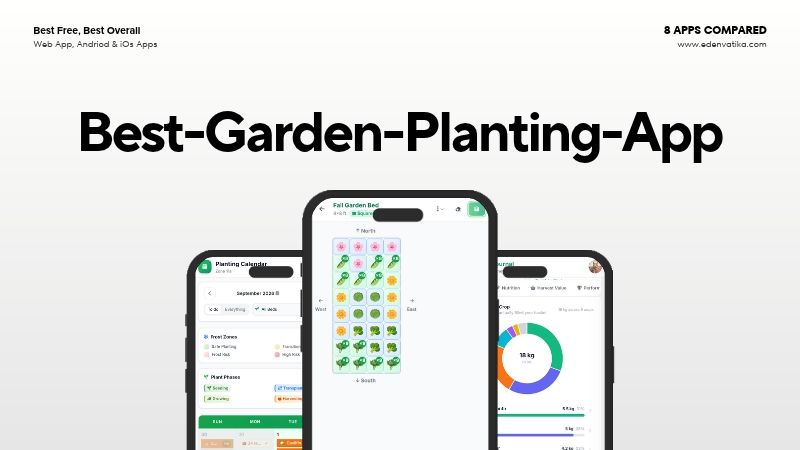
- An AI planner that fills a bed in seconds (Pro): pick Max Yield, Balanced, Low Maintenance or Companion-Focused, and it places companions together, keeps clashing plants apart and flags rotation repeats from your bed history.
- Companion badges while you plan, free, from 900+ good pairings and 254 to avoid.
- Harvest log with grocery value, an end-of-season review, and on Pro full analytics and Plant Doctor photo checks.
👎 Watch out for
- No App Store app yet. Android has an app on Google Play; on iPhone you add it to your home screen from Safari.
- A smaller community than Planter or GrowVeg, though support replies quickly.
💲 Price: free for 2 beds. Pro is $4.99/month or $19.99/year (founding price, locked for life; $29/year after), or $99 once ($79 for early members). Every account starts with a 14-day Pro trial, no card, and there's a 48-hour refund after your first payment.
Try it free — 14-day Pro trial, no card →
2. Seedtime — Best Calendar-Driven Task List (73/100)
Best for: gardeners who think in to-do lists and want succession sowing planned for them.
Add a crop to Seedtime's calendar and it works out the seed-start, transplant and harvest dates from your frost dates, then turns them into a task list. Miss a job and it reschedules from the day you actually did it.
You plan in the web app, and an iPhone app keeps your tasks and notes with you in the garden.
👍 What we like
- Strong task automation, with rescheduling when life gets in the way.
- Garden Blocks: ready-made crop plans for continuous harvests.
- A generous free plan: one calendar, one layout with up to 8 beds, unlimited tasks and journal entries, and companion suggestions.
👎 Watch out for
- Weather and full bed shapes are paid features, and the paid plans are the most expensive here.
- Harvest analytics only come with the top plan.
💲 Price: free. Basic is $84/year ($7/month billed yearly, or $10 monthly) and adds full bed shapes, weather and more AI credits. Unlimited is $168/year and adds unlimited calendars and layouts, inventory, and Records & Analytics. Paid plans have a 7-day trial and a 30-day money-back guarantee.
3. Planter — Best on a Phone (71/100)
Best for: square-foot gardeners who plan on their phone and like a good-looking app.
Planter was built phone-first, and it shows. Dragging plants onto its square-foot grid is smooth, and companions show up as you plan. Its calendar tells you when to start seeds, transplant and harvest.
👍 What we like
- The nicest mobile planner here, on iOS, Android and Amazon Fire.
- 1,000+ varieties across 80+ plants, plus your own custom plants.
- A fair price with a lifetime option.
👎 Watch out for
- It stops at planning. No weather, harvest tracking or automatic tasks.
- One grid style. Pots, vertical systems and hydroponics don't really fit.
💲 Price: free for one garden, with ads. Premium is $24.99/year or $99.99 once, and adds unlimited gardens, no ads, notes and the web app.
4. GiddyCarrot — Best Free Logging (64/100)
Best for: gardeners who just want somewhere clean to log what they planted and harvested.
GiddyCarrot is a tracker, not a guide. Log your plantings, harvests and tasks, and over time it builds stats on which varieties did well in your garden.
👍 What we like
- A generous free tier: 100 seeds, plantings, harvests and tasks, with one garden layout. No card needed.
- Variety performance stats, free.
- A simple, unfussy interface.
👎 Watch out for
- It records, it doesn't guide. No weather, AI or automatic tasks.
- Web only, with no mobile app.
💲 Price: free for 100 items. Pro is $40/year ($3.33/month, billed annually) and adds unlimited seeds, plantings, harvests, tasks and garden layouts, personalised planting schedules as PDFs, CSV export and daily email reminders. There's a 14-day money-back guarantee.
5. Gardenize — Best Plant Diary (60/100)
Best for: gardeners who want a photo record of every plant, year after year.
Gardenize gives every plant its own profile with photos, dates, places and notes. Its database lists 45,000+ plants, and it can identify a plant from a photo.
👍 What we like
- The best dedicated garden diary on this list.
- A huge plant database, great for ornamentals, trees and shrubs.
- It gets more useful every season you log.
👎 Watch out for
- Not a planner. No layout grid, planting calendar or weather.
- Only as good as your logging habit.
💲 Price: free basic diary. The App Store lists premium at $6.99/month or $34.99/year.
6. GrowVeg — Best Desktop Layout Tool (58/100)
Best for: gardeners who plan at a computer and want to draw the whole garden to scale.
GrowVeg's layout tool is polished: draw beds to scale, drag plants in, and see rotation conflicts as you plan. Its planting dates use climate data from over 5,000 weather stations, and it emails you every two weeks with what to sow next.
👍 What we like
- The best desktop layout tool on this list.
- Crop rotation shown right in the layout, plus "copy to next year".
- A big library: 408 plants and over 21,000 varieties.
👎 Watch out for
- No mobile app. It runs in a browser, which is fiddly on a phone in the garden.
- Mostly a planning tool. Little to do once the growing season starts.
💲 Price: 7-day free trial, then $35/year auto-renewing, $50 for one year, or $85 for two years.
7. Smart Gardener — For Organic Growers Who Want Weekly Orders (54/100)
Best for: committed organic growers who want to be told what to do each week.
Tell Smart Gardener where you live and how many people you're feeding, and it builds a planting plan from 3,000+ organic varieties. Then it sends a weekly to-do list from soil prep to harvest.
👍 What we like
- Weekly to-do lists covering the whole growing cycle.
- A big organic variety database.
- Community observations from gardeners growing the same varieties.
👎 Watch out for
- No free plan. The app is free to download, but you need a subscription to use its features.
- Pricing is only shown in the app store, not on a public pricing page.
💲 Price: the App Store lists $19.99 per quarter or $39.99/year.
8. Planta — For Houseplants (Not Really in This Race) (49/100)
Best for: houseplant owners. Not outdoor vegetable gardens.
Planta tells you when to water, mist, feed and repot each houseplant, and can diagnose problems from a photo. It's very good at that, and it's here only because it shows up in "garden app" searches.
👍 What we like
- The best houseplant care schedules we've seen.
- Photo diagnosis and a handy light meter.
👎 Watch out for
- No use for outdoor gardens: no layout, planting calendar or crop planning.
💲 Price: free watering reminders. US App Store prices vary: about $9.99/month, or $35.99–$47.99/year.
Pricing at a Glance
| App | Free | Monthly | Yearly | Worth upgrading? |
|---|---|---|---|---|
| EdenVatika | ✅ 2 beds | $4.99 | $19.99 founding · $99 lifetime | Yes — best value here |
| Seedtime | ✅ 1 calendar, 8 beds | $10 | $84 · $168 | If you want weather and full bed shapes |
| Planter | ✅ 1 garden | — | $24.99 · $99.99 lifetime | If you love mobile planning |
| GiddyCarrot | ✅ 100 items | $3.33 (billed yearly) | $40 | Free covers most people |
| Gardenize | ✅ Basic diary | $6.99 | $34.99 | For dedicated plant journallers |
| GrowVeg | ❌ 7-day trial | — | $35–$50 | If you plan at a desk |
| Smart Gardener | ❌ None | $19.99/quarter | $39.99 | Only for weekly organic task lists |
| Planta | ✅ Watering reminders | ~$9.99 | $35.99–$47.99 | For houseplants only |
Our Honest Recommendation
Most garden apps are fine in March. The trouble is June, when the weather turns, something's going yellow, and you can't remember when you last watered the courgettes.
If you want one app that's still useful in August, EdenVatika is the best option at this price. Its jobs write themselves, the weather shapes them, and every harvest makes next season's plan smarter. The free tier covers many home gardens on its own.
If you mostly plan on your phone and want something simple, pick Planter.
If you think in checklists, pick Seedtime.
If you want to spend nothing, start with EdenVatika's free tier or GiddyCarrot's.
The best garden app is the one you're still opening in August. Pick the one that fits how you garden — then go water your tomatoes.
Frequently Asked Questions
What is the best garden planning app in 2026?
EdenVatika scored highest in our test (83/100). It plans beds and containers, writes your care jobs automatically, adds weather and frost alerts, and tracks harvests. Seedtime (73) and Planter (71) came second and third.
What is the best free garden planning app?
EdenVatika's free tier gives you 2 beds, companion badges, automatic jobs, weather and frost alerts, and unlimited harvest logging. Seedtime's free plan gives you a full calendar with unlimited tasks, and GiddyCarrot gives you 100 free items. GrowVeg (trial only) and Smart Gardener have no lasting free plan.
What's the difference between garden planning software and a planting calendar?
Planning software is about where: bed layouts, spacing, companions and rotation. A planting calendar is about when: sowing, transplanting and harvest dates from your frost dates. The best apps, like EdenVatika, do both. For a calendar-first comparison, see our best free planting calendar apps.
Which garden app is best on mobile?
Planter is the most polished phone app here, and Gardenize also has native apps. EdenVatika has an Android app on Google Play and runs from your home screen on iPhone. GrowVeg runs only in a browser.
Is a paid garden app worth it?
For one or two beds, a free tier is usually enough. Paying makes sense once you want weather-linked jobs, crop rotation across years, or unlimited beds. EdenVatika Pro at $19.99/year gave the best value for money in our test.
🌱 See the winner in action
Open a fully planted demo garden with real beds, jobs, harvests and history. No signup, no card.
Open the Live Demo →Ready to plan your own? Create a free account. It starts with a 14-day Pro trial.