Best Garden Planting App 2026: 8 Apps Compared on What and When to Plant
Seed packets say "sow after last frost" and nobody knows when that is. We compared eight planting apps on one job: telling you what to plant, and when, with prices checked in October 2026.
Every spring, the same thing happens.
The seed packets come out. The back of each one says "sow after last frost." And nobody in the house actually knows when that is.
So the tomatoes go in a week too early. The lettuce goes in a month too late. And the carrots, well, nobody remembers planting the carrots at all.
A good planting app fixes exactly this. It knows your frost dates, tells you what to sow this week, and remembers what grew where last year.
We compared eight popular options on that one job: helping you decide what to plant, and when.
⚡ Quick picks
- Best all-rounder: EdenVatika — frost-date planting calendar, square-foot planner, a to-do list that writes itself, weather alerts, harvest tracking and rotation, free tier
- Best for crop rotation on desktop: GrowVeg — rotation warnings from past plans and a 400+ plant database
- Best mobile experience: Planter — clean square-foot grid, fast companion planting lookup
- Best for journaling: Gardenize — photo diary and plant collection tracking
- Best free planting calendar: Seed to Spoon — location-based planting dates, free to download
- Best for US zone scheduling: Seedtime — frost-date calendar that turns into a task list
- Best for UK allotments: VegPlotter — month-by-month plot plans with rotation warnings
- Best for beginners who like templates: Fryd — ready-made bed plans and a gardening community
Prices and plans were checked in October 2026. App prices change, so check the store before you buy.
What Makes a Good Planting App?
"Garden app" covers a lot of ground. Some are plant diaries. Some are drawing tools. Some are mostly a shop.
A planting app should answer four questions without making you do the maths:
- When do I sow this, where I live? Dates should come from your local frost dates, not a national average.
- What should I be doing this week? Sowing, transplanting and harvest reminders, ideally as a task list.
- Will it fit? A layout or grid that shows how many plants a bed really holds.
- Did this grow here last year? Rotation memory, so the tomatoes don't go back into the same bed every year.
Few apps do all four well. Here's how the eight compare.
Side-by-Side Comparison
| App | Free plan | Paid (USD unless noted) | Local planting dates | Layout | Rotation warnings | Works on |
|---|---|---|---|---|---|---|
| EdenVatika | Yes, 2 beds | $19.99/yr founding price (normally $29), $4.99/mo or $99 once | ✅ Your frost dates | ✅ Square-foot grid: beds, pots, baskets, towers, hydroponics | ✅ Pro | Browser on any phone or computer, Android app |
| GrowVeg | 7-day trial only | $35/yr recurring ($50 for 1 year, $85 for 2) | ✅ From 5,000+ weather stations | ✅ Drawn-to-scale plans | ✅ | Browser |
| Planter | Yes, 1 garden, with ads | $24.99/yr or $99.99 once | ✅ Sow, transplant, harvest | ✅ Square-foot grid | — | iOS, Android, Fire (web on Premium) |
| Gardenize | Yes, basic diary | About $34.99/yr in the App Store | — Not its focus | — | — | iOS, Android, web |
| Seed to Spoon | Yes, free download | Optional premium: $4.99/mo or $46.99/yr | ✅ Calculated for your location | ✅ Visual planner | — | iOS, Android, web |
| Seedtime | Yes, 1 calendar + 1 layout (8 beds) | $84/yr Basic, $168/yr Unlimited | ✅ Your frost dates | ✅ Beds, pots, towers | — | Web app + iPhone app |
| VegPlotter | Yes, limited plantings per year | Essentials and Advanced, shown in your currency | ✅ Adjusts to your climate | ✅ Drawn-to-scale plots | ✅ | Browser |
| Fryd | Yes | Super Fryd: €40/yr, €10/mo or €165 once | ✅ Seeding calendar | ✅ Bed planner | Coming soon | iOS, Android, web |
1. EdenVatika — Best All-Rounder
Yes, this is our app. We've judged it by the same four questions as everyone else, and it's the only one here that answers all four in one place.
When do I sow this? EdenVatika builds a planting calendar from your own frost dates. Every crop gets its seed-start, plant-out and harvest window, and if you transplant early or late, the harvest date moves with you.
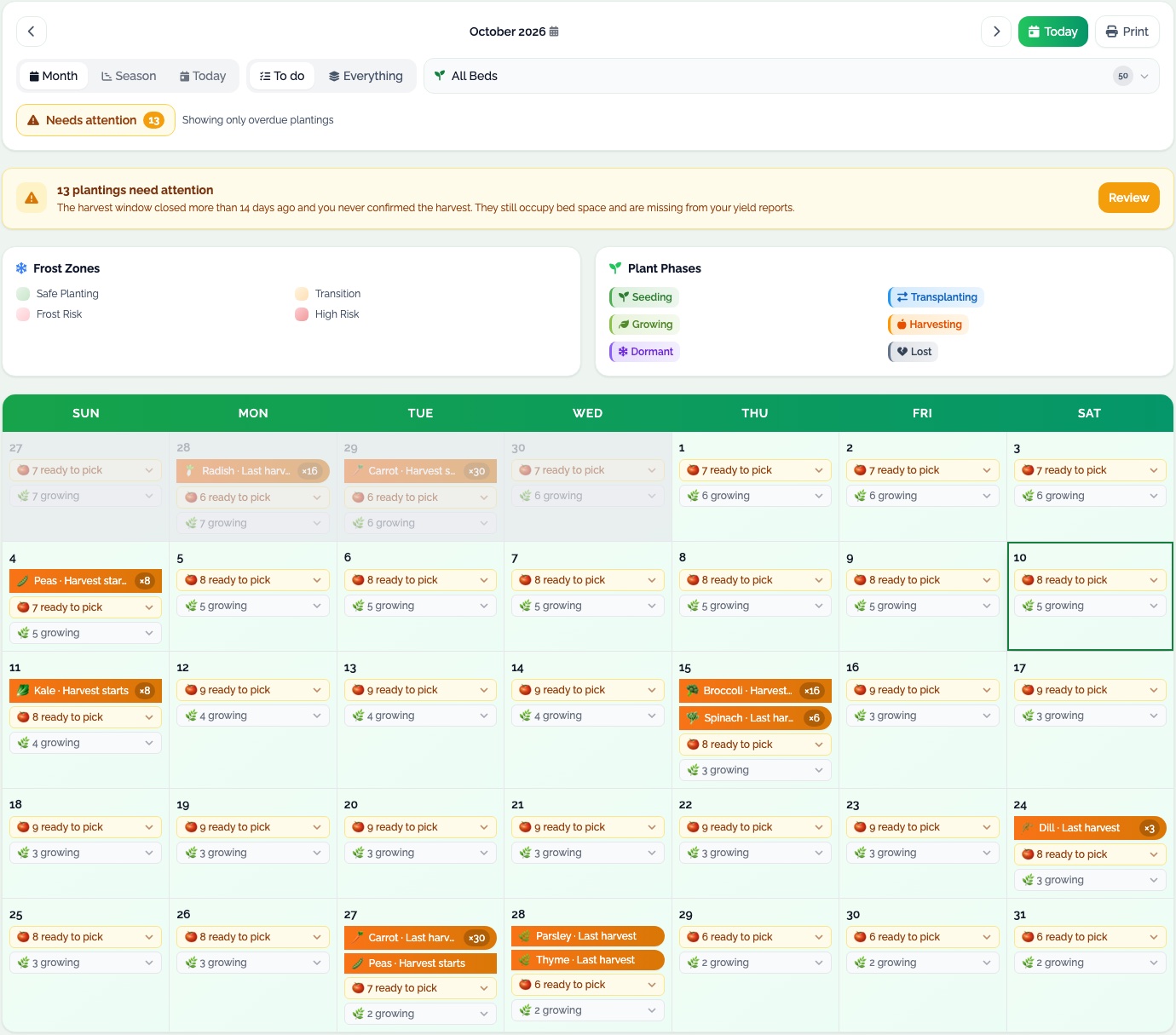
What should I do this week? Plant something and EdenVatika writes its jobs for you: watering, weeding, feeding, transplanting and harvest, matched to whether it's in a raised bed, a pot, a hanging basket or a hydroponic system. A reminder arrives each morning. It also checks the forecast, tells you whether to water today, and sends a frost alert when tender crops are outside.
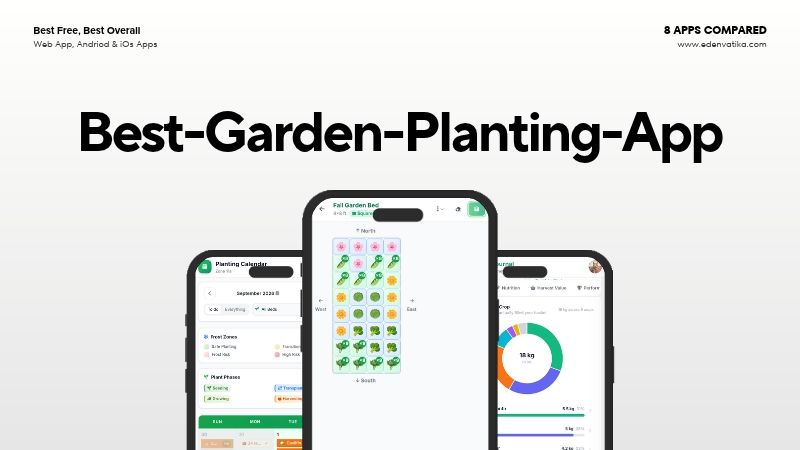
Will it fit? Plan beds square by square and see exactly how many plants fit. Good and bad neighbours light up as you plan, from 900+ companion pairings. On Pro, the AI Garden Planner can fill a bed for you with crops that suit your weather, grow well together and follow rotation.
Did this grow here last year? Every bed keeps its history, notes and pest log, warns you before you plant the same family again, and suggests what to try next.
And it keeps going after the harvest: log pickings with their grocery value, review the season crop by crop, and on Pro see analytics for value, nutrition and your best crops.
- Free plan: 2 beds, the planner and planting calendar, 174 plants, jobs made for you with a morning reminder, weather and frost alerts, unlimited harvest logging, journal, season review, seed inventory and 35 plant-problem guides.
- Pro: unlimited beds, 3-year bed history with rotation warnings, AI Garden Planner, Plant Doctor photo check, succession planting, 7-day forecast, analytics and PDF export.
- Price: $19.99/year founding price (normally $29), $4.99/month, or $99 once. Every account starts with a 14-day Pro trial, no card needed.
- Works on: any browser on iPhone, Android or computer, plus an Android app.
Where it falls short: GrowVeg's plant library is bigger (408 plants against 174), and on iPhone EdenVatika runs in Safari rather than as an App Store app.
Best for: gardeners who want one app to plan the beds, run the daily jobs and remember every season.
2. GrowVeg — Best for Crop Rotation on Desktop
GrowVeg has been around for years, and it shows in the depth of its plant database: over 400 vegetables, herbs, fruit and flowers, with more than 21,000 varieties.
Its planting calendar uses climate data from over 5,000 weather stations. You can also enter your own frost dates. Every two weeks it emails you what to plant next.
The rotation feature is the standout. GrowVeg remembers your previous plans and shows where a crop shouldn't go this year.
- Price: 7-day free trial, then $35/year on auto-renew ($50 for one year, $85 for two). UK pricing starts at £25/year.
- Works on: any browser, no download.
Where it falls short: there's no free plan after the trial, and the drawing tools feel more at home on a big screen than on a phone.
Best for: serious vegetable growers who plan at a desk and want rotation handled for them.
👉 Full head-to-head: EdenVatika vs GrowVeg
3. Planter — Best Mobile Experience
Planter is the one people tend to show their friends. It's a neat square-foot grid on your phone, with plants you drag into place.
Tap a plant and it shows its good and bad companions straight away. The calendar tells you when to start seeds, transplant and harvest.
Its library holds 80+ plants and 1,000+ varieties, and you can add your own.
- Free plan: one garden, the growing calendar, custom plants and a seed box, with ads.
- Premium: $24.99/year or $99.99 once, for unlimited gardens, no ads, notes and the web app.
- Works on: iOS, Android and Amazon Fire.
Where it falls short: there's no crop rotation tracking, and the free plan covers only one garden.
Best for: square-foot gardeners who plan on their phone.
👉 Full head-to-head: EdenVatika vs Planter
4. Gardenize — Best for Journaling
Gardenize isn't really a planting planner, and it doesn't pretend to be. It's a garden diary.
You log each plant and every job with a photo, date and place. Over the seasons that builds into a record of your whole garden. Its database lists over 45,000 plants, and it can identify plants from a photo.
- Price: a free basic version. The App Store lists premium at about $34.99/year or $6.99/month.
- Works on: iOS, Android and web.
Where it falls short: no planting calendar and no bed layout, so you'll still need something else to plan.
Best for: ornamental gardeners and anyone who wants a photo record more than a schedule.
👉 Full head-to-head: EdenVatika vs Gardenize
5. Seed to Spoon — Best Free Planting Calendar
Seed to Spoon is free to download and gives you personalised planting dates for your location, along with estimated sprouting and harvest dates.
It also packs in a lot of extras: a visual garden planner, companion planting guides, pest identification, recipes, and an AI chatbot called Growbot. It reports over a million downloads and a 4.8★ rating on iOS.
- Price: free, with optional premium at $4.99/month or $46.99/year. Premium adds unlimited plant logging, unlimited Growbot questions and all the curated garden plans.
- Works on: iOS, Android and web.
Where it falls short: no crop rotation memory, and some of the most useful extras sit behind premium.
Best for: beginners who mainly want to know when to plant, without paying.
👉 Full head-to-head: EdenVatika vs Seed to Spoon
Want only free options? We tested free tiers head to head in Best Free Planting Calendar App.
6. Seedtime — Best for US Zone Scheduling
Seedtime builds your planting calendar from your frost dates and location, then turns it into a task list. You always know what's due this week.
Its "Garden Blocks" are done-for-you crop plans for continuous harvests, which is handy if succession sowing makes your head spin.
- Free plan: one calendar, one layout with up to 8 rectangular beds, unlimited tasks and journal entries, companion suggestions and 10 AI credits a month.
- Paid: Basic $84/year ($7/month billed yearly) or Unlimited $168/year, with a 7-day trial and a 30-day money-back guarantee.
- Works on: web app for planning, plus an iPhone app for tasks and notes.
Where it falls short: the paid plans cost the most here, and weather is only included on paid plans.
Best for: US gardeners who want a calendar that tells them exactly what to do and when.
👉 Full head-to-head: EdenVatika vs Seedtime
7. VegPlotter — Best for UK Allotments
VegPlotter is built around the allotment year. You draw your plot to scale, then plan it month by month.
It adjusts to your local climate, shows when to sow indoors, transplant and expect a first harvest, and warns you when similar crops land in the same spot. A monthly "Jobs" list tells you what to do next.
- Free plan: unlimited garden layouts and a limited number of plantings each year.
- Paid: Essentials and Advanced plans, with prices shown in your currency. Advanced adds custom plants with their own schedules.
- Works on: any modern browser, on desktop, tablet or phone.
Where it falls short: the free planting limit fills up fast on a full allotment.
Best for: UK allotment holders who plan the whole year in one go.
👉 Full head-to-head: EdenVatika vs VegPlotter
8. Fryd — Best for Beginners Who Like Templates
Fryd (Garden Planner by Fryd) is popular across Europe. You build a digital copy of your beds, or start from a ready-made planting plan tested by experienced gardeners.
Its Companion Finder suggests good neighbours, the seeding calendar tells you when to sow, and a community lets you browse other people's plots and ask questions.
- Free plan: the bed planner, plant library, companion finder and community.
- Super Fryd: €40/year, €10/month or €165 once, with a 7-day trial. It adds templates you can copy, editable planting dates, succession planting, reminders with a to-do list, and multiple plans.
- Works on: iOS, Android and web.
Where it falls short: crop rotation planning is still marked "coming soon", and prices are in euros.
Best for: new gardeners who'd rather copy a proven plan than start from a blank bed.
👉 Full head-to-head: EdenVatika vs Fryd
Which Planting App Should You Choose?
| If you want… | Pick |
|---|---|
| Planting dates, a bed layout and rotation in one app | EdenVatika |
| The biggest plant database and desktop planning | GrowVeg |
| A polished square-foot grid on your phone | Planter |
| A photo diary of everything you grow | Gardenize |
| Free planting dates and nothing more | Seed to Spoon |
| A weekly to-do list built from your frost dates | Seedtime |
| A UK allotment planned month by month | VegPlotter |
| Ready-made bed plans to copy | Fryd |
Whichever you choose, start with one bed. Every app on this list is easier to learn on a small plan than a whole garden.
Frequently Asked Questions
What is the best garden planting app?
For most home gardeners, the best planting app combines local planting dates, a bed layout, daily reminders and crop rotation memory. EdenVatika does all four, with a free plan. GrowVeg is the strongest choice if you want the biggest plant database and plan at a desk.
Is there a completely free planting app?
Seed to Spoon is free to download and gives personalised planting dates, with an optional premium plan. EdenVatika, Planter, Seedtime, VegPlotter and Fryd also have free plans with limits on beds, gardens or plantings.
Which planting app works out dates from my frost dates?
EdenVatika, Seedtime and GrowVeg all base planting dates on your local frost dates. Not sure what yours are? Look them up free with our Frost Date Lookup.
Which garden apps track crop rotation?
GrowVeg, VegPlotter and EdenVatika Pro all warn you when you plant the same crop family in the same spot. Fryd lists rotation planning as coming soon. Our crop rotation guide explains why it matters.
Do I need a paid planting app?
Not to start. A free plan is enough for one or two beds. A paid plan is worth it once you have several beds, want rotation tracked across years, or want reminders for succession sowing.
What's the difference between a planting app and a garden planning app?
A planting app focuses on when: sowing dates, reminders and what to do this week. A garden planning app focuses on where: layouts and spacing. The best apps do both. For a deeper test of layout tools, see our garden planning apps comparison.
Try the Planting Calendar Built Around Your Garden
If the all-rounder sounds right, you don't have to take our word for it.
- 📅 Dates for your garden. Sowing, transplanting and harvest windows from your own frost dates.
- 📐 See it fit. Plan beds square by square, and know when a bed is full before you buy seeds.
- 🔁 Remember last year. Three-year bed history and rotation warnings, so the tomatoes move on.
Need a layout to start from? Copy one of our 20 free vegetable garden templates.
🌱 See a fully planted garden first
Open a real demo garden with beds, planting dates and harvests, all live. No signup.
Open the Live Demo →Ready to plan your own? Create a free account. Every account starts with a 14-day Pro trial, no card needed.